Quarta: A Geometric Color Font for Modern Design
There's a moment in every design project where the typography either clicks into place or feels like an afterthought. You've chosen your imagery, refined your color palette, and laid out your content, but something's missing. Often, the missing piece is a typeface with enough personality to carry the visual weight of your brand without overwhelming it. Enter Quarta, a geometric bicolor font that blends modern aesthetics with practical versatility, offering designers and creators a fresh tool for projects that demand both clarity and character.
What Makes Quarta Visually Distinct?
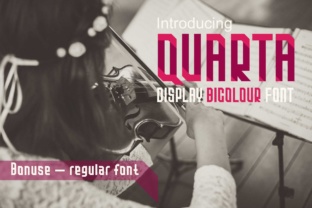
At its core, Quarta is a display sans serif font built on clean geometric foundations. Its letterforms feature balanced proportions and consistent stroke widths, which lend a sense of order and contemporary sophistication. But what truly sets it apart is its bicolor capability. Each character is designed with two distinct color layers, allowing you to apply separate fills to different parts of the letter. This creates a vibrant, layered effect that can transform simple headlines or logos into eye-catching visual statements.
The font includes a full multicolor vector alphabet, numerals, and punctuation marks. Because it's built as vector shapes, you can manipulate each component individually in programs like Adobe Illustrator CC 2018 or later, InDesign CC 2018, and Photoshop CC 2017 or newer. This means you're not just choosing a color for your text—you're designing with color as an integral part of the letterform itself. For anyone working on branding materials, social media graphics, or packaging, this feature opens up creative possibilities that standard single-color fonts simply can't match.
Where Quarta Fits into Real-World Projects
Think about the last time a brand's logo or packaging made you stop scrolling or pause in an aisle. Chances are, the typography played a significant role. Quarta's geometric structure and color-blocking potential make it particularly effective for projects where visual impact matters. Consider using it for:
- Logo design and brand identity systems – The bicolor feature allows you to incorporate brand colors directly into the letterforms, creating a cohesive visual identity that feels intentional and polished.
- Packaging design – On shelf labels, product boxes, or boutique bags, Quarta's modern aesthetic can help products stand out while maintaining readability at various sizes.
- Social media graphics – For Instagram stories, Pinterest pins, or Facebook headers, the colorful vector alphabet adds visual interest that can increase engagement and stop-the-scroll appeal.
- Website headers and blog titles – When used strategically for headlines or hero text, Quarta brings energy to digital layouts without sacrificing clean design principles.
- Print materials and posters – Event flyers, business cards, and promotional posters benefit from a typeface that commands attention while remaining legible.
- Invitations and editorial layouts – Wedding stationery, magazine spreads, and digital product covers can all leverage Quarta's contemporary style to feel current and refined.
- Merchandise and marketing assets – Tote bags, mugs, stickers, and ad creatives gain a professional edge when paired with thoughtful, modern typography.
Practical Tips for Working with a Bicolor Font
Using a color font like Quarta effectively requires a slightly different approach than working with standard typefaces. Here are some considerations to keep in mind as you integrate it into your workflow.
Choose your color palette intentionally. Since the bicolor feature lets you assign two different fills to each letter, think about how those colors interact. High-contrast combinations—like a deep navy paired with a bright coral—create bold statements, while analogous colors (such as teal and mint) offer a more subtle, harmonious effect. Always test your color choices against different backgrounds to ensure readability.
Consider the context of your project. A vibrant, multicolor headline might work perfectly for a children's brand or a creative agency's social media, but it could feel out of place on a formal corporate report. Match the font's personality to your project's tone and audience expectations.
Test font pairings early in your process. Quarta works well alongside simpler sans serif fonts for body text or secondary information. Pair it with a clean, neutral typeface like a classic grotesque or a humanist sans serif to maintain balance. Avoid combining it with other highly decorative fonts, as competing visual styles can create confusion rather than cohesion.
Keep readability front and center. While the bicolor effect is visually engaging, make sure your text remains legible at the sizes you'll be using. Test your designs at various scales—what looks striking on a desktop screen might lose clarity on a mobile device or when printed at a smaller size.
Review the included font styles before starting. Familiarize yourself with the full character set, including numerals and punctuation, so you can plan your designs with all available options. Understanding what's in the package helps you avoid surprises later in the production process.
Licensing and Software Considerations
Before incorporating Quarta into commercial work, take a moment to review the licensing terms. Most premium fonts come with specific usage rights that outline whether you can use them for client projects, merchandise, digital products, or broadcast materials. Understanding these terms upfront protects you legally and ensures your investment is well-spent.
Also, remember that the multicolor version of Quarta requires vector editing software that supports color font technology. Adobe Illustrator CC 2018 and later, InDesign CC 2018, and Photoshop CC 2017 or newer are among the programs that fully support this feature. If you're working in a different environment, you may still be able to use the standard single-color version, but the full bicolor experience depends on compatible software. Checking these technical requirements before you begin saves time and frustration.
Building a Stronger Visual Identity with Thoughtful Typography
Typography is one of the most powerful yet often underestimated elements of visual communication. The right typeface doesn't just display words—it conveys mood, establishes credibility, and reinforces brand recognition. When you choose a font like Quarta for your projects, you're making a deliberate decision to bring modernity and visual interest into your work.
For small business owners and entrepreneurs, this kind of intentionality can make a meaningful difference. A cohesive visual identity—where your logo, website, packaging, and social media all share a consistent typographic voice—helps customers recognize and remember your brand. It signals professionalism and attention to detail, qualities that build trust over time.
For designers and content creators, having a diverse toolkit of typefaces—including display fonts, serif fonts, script fonts, and creative options like bicolor designs—gives you the flexibility to match typography to the unique goals of each project. Not every brief calls for the same solution, and understanding when to use a bold, colorful display font versus a quiet, elegant serif is part of what makes design work effective.
Quarta isn't a one-size-fits-all solution, and that's precisely its strength. It's a specialized tool designed for moments when you want your typography to do more than simply communicate words—when you want it to capture attention, express personality, and contribute to a larger visual story. Used thoughtfully, it can become a valuable part of your design asset library, ready to elevate branding projects, marketing campaigns, and creative endeavors with its distinctive geometric charm and color-forward approach.